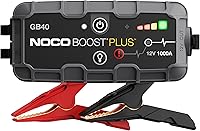
How to Use the NOCO Boost GB40
Here's how to use a NOCO GB40: confirm vehicle compatibility, connect at the approved jump points, check the indicators, and attempt a start. Follow both manuals for connection order, cranking limits, and disconnection, then recharge the unit.
On this page (8 sections)
- What should you check before using a NOCO GB40?
- How do you use a NOCO GB40 from setup to starting?
- What should you do if the GB40 shows a warning or the engine won't start?
- How do you disconnect the NOCO GB40?
- How do you recharge and care for the GB40?
- When is the NOCO GENIUS1 a better choice?
- What can you use if you don't have a jump starter?
- Which option should you keep for your vehicle?
Here's how to use a NOCO GB40: check vehicle compatibility, prepare the vehicle, connect at its approved jump points, confirm the indicators, and attempt a start. Follow the GB40 and vehicle manuals for the connection sequence, cranking limits, and disconnection.
The key is to prepare before the battery fails. Find your vehicle's jump points and keep the instructions accessible so you aren't trying to identify terminals beside a stalled car.
What should you check before using a NOCO GB40?
Confirm vehicle voltage, engine size, and approved jump points before connecting anything. The GB40 is a 12V jump starter rated for gas engines up to 6.0 liters and diesel engines up to 3.0 liters.
Engine size is a first filter, not the whole decision. Your vehicle manual must also permit the procedure, including any instructions for remote terminals or a separate ground point.
Check the GB40's charge indicators and inspect its cables, clamp jaws, and housing. Stop if you find damaged insulation, loose parts, or other visible damage.
Don't jump a battery that's cracked, leaking, swollen, or suspected to be frozen. A jump starter can't make a damaged battery safe to use.
The GB40 suits drivers who want starting help without a donor vehicle. Skip it if your vehicle exceeds its limits or your main goal is charging a battery while the vehicle sits.
For a different engine or vehicle type, see what size jump starter you need. Our portable car jump starter buying guide explains the other features worth comparing.
How do you use a NOCO GB40 from setup to starting?
Use the GB40 in distinct steps: prepare, connect, check, start, and disconnect. Don't combine them into one rushed action, especially if a warning appears.
How to prepare to use your NOCO GB40
Park securely, apply the parking brake, and select Park or Neutral as your vehicle manual directs. Switch off the ignition and accessories such as lights, climate control, and audio before making connections.
Work in a ventilated area and keep flames and smoking materials away from the battery. Remove dangling jewelry and keep your face away from the battery while connecting equipment.
Locate the positive connection and the approved negative or ground connection before bringing the clamps near them. Some vehicles use remote jump points, so an exposed battery terminal isn't automatically the correct place.
Position the pack on a stable surface where it can't fall into the engine bay. Route cables away from belts, fans, and hot parts, including parts that could move once the engine starts.
Connect the clamps at the approved points
Match the red clamp to the approved positive point and the black clamp to the negative or ground point specified for your vehicle. Use the connection sequence in the GB40 instructions and your vehicle manual.
Make sure each clamp grips securely at the intended contact point. Don't let the clamps touch each other, bridge terminals, or rest against unintended metal surfaces.
NOCO equips the GB40 with spark-proof and reverse-polarity protection. Those safeguards don't replace identifying the terminals correctly or securing the clamps.
Check readiness before cranking
Follow the GB40's power-on instructions and check its indicators before turning the key or pressing Start. If an indicator is unfamiliar, identify it before proceeding.
Attempt the start only when the setup meets the manual's readiness checks. Use NOCO's cranking limits and required pauses rather than holding the starter until something happens.
For a broader walkthrough, read how to use a portable jump starter. Our explanation of how a jump starter works covers why the pack helps during cranking.
What should you do if the GB40 shows a warning or the engine won't start?
Stop and identify the problem before another attempt. A warning, slow cranking, and an engine that cranks normally without firing call for different next steps.
For a warning light, find the exact symbol or indicator in the GB40 manual. Don't assume every red light means reversed clamps, and don't change modes simply to bypass an unexplained warning.
If a connection needs correcting, first follow NOCO's shutdown and disconnection instructions. Recheck the approved contact points and clamp grip before reconnecting.
Slow cranking can involve low pack charge, poor contact, or a vehicle battery problem. These are checks to make, not a diagnosis based on sound alone.
If the engine cranks normally but doesn't fire, more starting power may not solve the fault. Avoid repeated attempts that drain the pack and strain the vehicle's starter.
Stop at the attempt limit in the instructions and get roadside or mechanical help. Also stop immediately if you notice smoke, a strong unusual odor, or damaged equipment.
How do you disconnect the NOCO GB40?
After the engine starts, disconnect as directed in both manuals. Keep your hands and cables clear of fans, belts, and hot surfaces while removing the clamps.
Keep the clamps separated throughout removal, then secure the cables so they can't snag. Switch off the pack as instructed before putting it away.
Don't leave the GB40 attached in an effort to refill the vehicle battery. It supplies starting power rather than serving as a charger or maintainer.
A successful jump also doesn't prove the battery is healthy. If the vehicle stalls again or needs another jump soon afterward, have the battery and charging system checked.
How do you recharge and care for the GB40?
Recharge after use and check the pack periodically so it's ready for the next emergency. Use the included USB-C cable with a power source that meets NOCO's instructions.
NOCO gives a recharge time of 3 hours. Use the charging indicators to confirm completion rather than assuming any USB source will finish within that time.
NOCO also claims up to 20 starts per charge. Don't treat that as a fixed allowance, since engine demand, battery condition, and the pack's remaining charge affect what you can expect.
Keep the clamps clean and dry, inspect the cables before packing them, and store the kit together. Follow NOCO's temperature guidance when choosing a storage spot in the vehicle.
The housing has an IP65 rating and rubberized over-molding, but it still needs sensible care. Don't submerge the pack, and let wet equipment dry according to its instructions before storage or charging.
The built-in flashlight can help you locate connection points in low light. USB power for a phone is useful too, but using it draws from the same emergency reserve.
See how to charge a jump starter for more charging and storage guidance.
When is the NOCO GENIUS1 a better choice?
Choose the GENIUS1 for charging or maintenance near an outlet, especially when a compatible vehicle sits unused. Choose the GB40 when you need portable help starting an engine.
The GENIUS1 fits owners maintaining a motorcycle, seasonal vehicle, or other suitable battery between uses. Its clamps and integrated eyelet terminals give you connection options for occasional or repeated access.
Match the charging mode to the battery's voltage and chemistry. Check battery capacity suitability too, rather than assuming that compatibility with a vehicle type means every battery in that category fits.
Its 1A output favors patient charging and maintenance. Skip it if you need an immediate roadside start or expect a large, deeply discharged battery to recharge quickly.
The temperature sensor adjusts charging for ambient conditions, and NOCO designs it for ongoing maintenance. That still requires a suitable battery, correct mode, and setup that follows the instructions.
Our jump starter vs battery charger comparison explains when keeping both tools makes sense.
What can you use if you don't have a jump starter?
Jumper cables are an alternative when a suitable donor vehicle is available and both vehicle manuals permit the setup. They don't supply power on their own.
The Cartman cables use 4-gauge copper-coated aluminum conductors and fit top-post and side-post batteries. Their 20 ft length helps when the vehicles can't park closely nose to nose.
They suit households with access to another compatible vehicle and drivers who want a cable backup. Skip them as your only plan if you often travel alone where finding a donor vehicle would be difficult.
Follow both vehicles' connection, starting, and disconnection instructions. Extra reach doesn't guarantee electrical compatibility or permit using any nearby vehicle as a donor.
If you need a standalone unit, compare the best jump starters. For the practical tradeoffs, read jump starter vs jumper cables.
Which option should you keep for your vehicle?
Choose the GB40 for independent starting help, the GENIUS1 for planned battery care, or the Cartman cables for a compatible donor-vehicle setup. Buy around the problem you need to solve.
For the GB40, confirm vehicle fit before weighing extras such as phone charging or the flashlight. Neither feature makes an unsuitable jump starter right for your engine.
Knowing how to use a NOCO GB40 means having the pack charged, the jump points identified, and the instructions ready before trouble starts. For a closer look at its features and buyer fit, read our NOCO Boost GB40 review.
Frequently asked questions
How do you use a NOCO GB40?
Confirm vehicle compatibility, switch off accessories, and connect the clamps at the approved jump points using both manuals. Check the GB40's indicators before cranking, observe its limits on attempts and pauses, then disconnect as directed after the engine starts.
Recharge the pack before returning it to storage.
What does the NOCO GB40 red light mean?
Identify the exact indicator in the GB40 manual before continuing; color alone isn't enough to choose a remedy. Stop the start attempt and follow the instructions for that warning, including safe shutdown and disconnection if required.
Don't swap clamps or select another mode just to clear an unexplained light.
Can you use a NOCO GB40 on a diesel?
Yes, the GB40 is rated for diesel engines up to 3.0 liters with a compatible 12V starting system. Check the vehicle manual for approved jump points and restrictions before connecting it.
A larger diesel or a different system voltage calls for equipment matched to that vehicle.
How long should you leave the NOCO GB40 connected?
Leave it connected only for the jump-start procedure described in the GB40 manual, then disconnect as directed. Follow its cranking limits and pauses rather than choosing a fixed waiting period.
The GB40 supplies starting power; leaving it attached longer doesn't turn it into a vehicle battery charger.